
The Hidden Cost of Manual Takedowns
When you discover a phishing site impersonating your brand, the clock is ticking. Every hour it stays live, more customers are deceived. Yet manual takedowns require contacting 10+ services individually, each with different forms, formats, and response times. Most teams only manage 2–3 before moving on.
The Misconception
“It won't be our company that gets attacked. We can work it out at the time.”
Anatomy of the Blind Spot
What a “Complete” Manual Takedown Actually Requires
Taking down a phishing site isn't one action. It's a coordinated campaign across multiple services. Most teams only cover a fraction of the available disruption channels.
What Most Teams Do
- Email the domain registrar's abuse desk
- Submit a browser protection report
- Maybe contact the hosting provider
What Gets Missed
- Additional browser protection reports (many browser users left unprotected)
- Threat intelligence feeds and industry blocklists
- Search engine delisting (phishing site still appears in search results)
- Hosting provider abuse desk (separate from registrar)
- Per-IP blocklist reports (for shared hosting infrastructure)
- Follow-up escalations when providers don't respond
Every missed channel is a window that stays open for the attacker. Browser users aren't warned. Search engines keep indexing the phishing site. Threat feeds don't update. The site stays dangerous for longer than it needs to.
The Attacker's Playbook
The Manual Takedown Timeline
From detection to disruption, manual takedowns leave the attacking site live for days while your team works through each service individually.
You Detect a Live Attack (Hour 0)
Your monitoring identifies a phishing site impersonating your brand. Evidence is clear: cloned login page, active credential harvesting. The clock starts.
Manual Research Begins (Hours 1–4)
Your team looks up the WHOIS registrar, finds the abuse contact, identifies the hosting provider, locates the correct browser protection submission forms. Each service has different requirements, formats, and submission processes.
Forms, Emails, and Waiting (Hours 4–24)
Abuse emails drafted individually. Browser protection reports submitted. Threat intelligence feeds notified. Blocklist reports filed. Each one requires different evidence formats. Your team context-switches between services all day.
Partial Progress (Days 1–3)
Some channels respond. A browser may add a warning. The registrar acknowledges receipt. The hosting provider asks for more evidence in a different format. The site is still live. Customers are still being phished.
Resolution, Eventually (Days 3–7+)
The site finally comes down after days of follow-ups, re-submissions, and escalations. By now, the attacker has harvested hundreds of credentials and may have already moved to a new domain.
The Missing Layer
One Click, Up to 12 Channels, Seconds Not Days
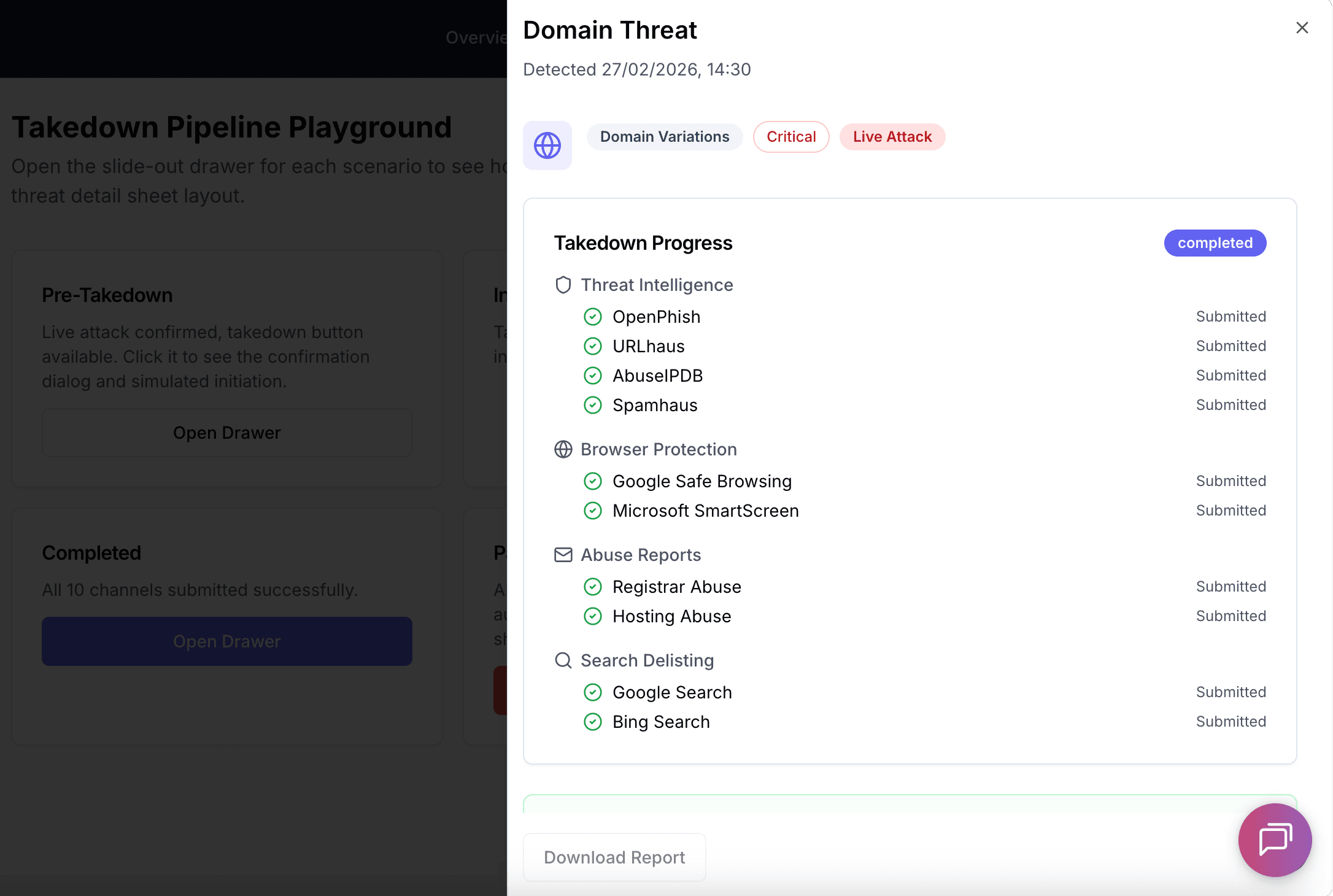
DefendDomain submits to up to 12 disruption channels at once. One confirmation triggers parallel reports to every service that can block, delist, or take down the attacking site.
Threat Intelligence Feeds
Industry blocklists and threat databases
Browser Protection
Major browser warning systems
Abuse Reports
Registrar & hosting provider abuse desks
Search Delisting
Major search engine delisting
- All channels fire simultaneously, no sequential waiting
- Evidence auto-formatted per channel requirements
- Professional HTML abuse reports with full evidence packages
- Automated follow-up and escalation if the site stays live
- Instant notification when the site is confirmed offline
- Real-time progress tracking per channel
- Complete audit trail for compliance
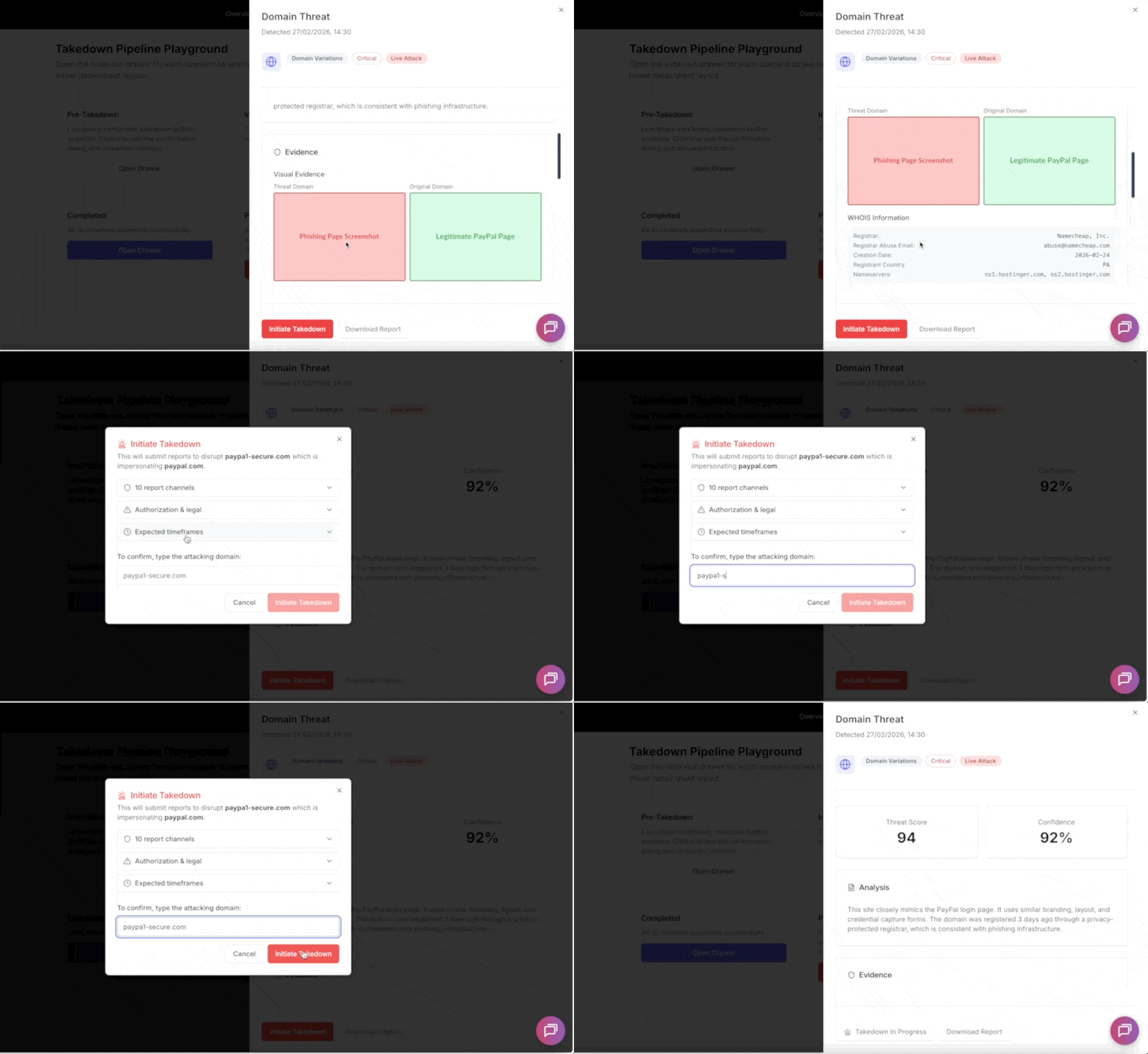
From confirmation to 10 parallel submissions in seconds
Manual Takedowns vs Automated Takedowns
The difference between spending days on form-filling and resolving in seconds.
| Capability | Manual Takedown |  DefendDomain DefendDomain |
|---|---|---|
| Time to first submission | 1–4 hours (research + drafting) | Under 30 seconds |
| Channels contacted | 2–3 (whatever team has time for) | Up to 12 simultaneously |
| Evidence formatting | Manual per-service formatting | Automatic per-channel formatting |
| Registrar abuse report | Manual email with evidence attachments | Professional HTML report sent automatically |
| Browser blocking | Separate form submissions per browser | API submissions in parallel automatically |
| Search delisting | Often forgotten entirely | Major search engines submitted automatically |
| Follow-up if site stays live | Relies on you to remember and chase | Automated escalation to registrar and TLD registry (1,000+ TLDs) |
| Knowing when it worked | Manually checking the site yourself | Automatic site-down detection with instant notification |
| Progress tracking | Spreadsheet or memory | Real-time dashboard per channel |
| Audit trail | Ad-hoc email records | Complete audit log with timestamps |
Bottom line: Manual takedowns are not just slow, they are incomplete by design. Most teams cover a fraction of the available disruption channels. Automated parallel takedowns close every window simultaneously, in seconds.
How It Works
Four steps from detection to coordinated action across all channels.
Confirm Live Attack
Escalate a detected threat to live attack status when you're certain it's genuine.
Authorize Takedown
Type the attacking domain name to confirm. Evidence is frozen for legal provenance.
Channels Fire in Parallel
Blocklists, browser protection, abuse desks, and search engines contacted simultaneously.
Track & Resolve
Track progress in real time. Automated follow-ups escalate until the site comes down.
Frequently Asked Questions
Common questions about automated takedowns.
Stop Spending Days on Manual Takedowns
See how automated parallel takedowns can neutralize threats targeting your brand in seconds, not days.

Speak with our team
We'll walk you through the automated takedown pipeline and show you how it works against live threats.